


In the modern construction industry, professional knowledge must go hand in hand with the ability to use technological tools for design, calculation, and construction project management. Proficiency in specialized software not only helps Civil Engineering students improve their learning efficiency but also gives them an advantage when applying for jobs after graduation. So, which essential software programs should students become familiar with while still at university?
AutoCAD – A Fundamental Tool for Reading and Developing Technical Drawings
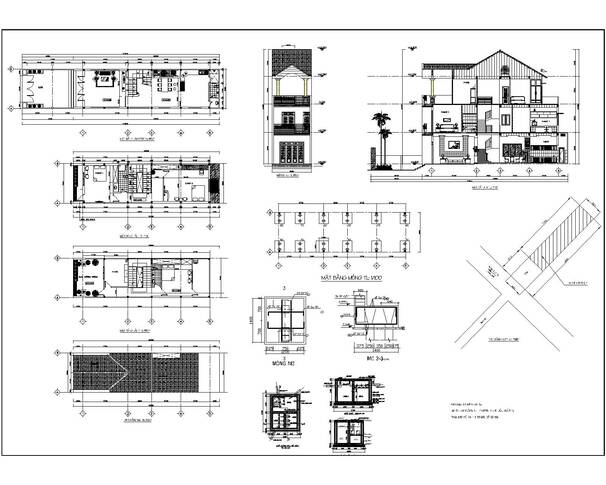
AutoCAD is one of the most widely used design software programs in the construction industry, particularly for developing 2D technical drawings. It is an important tool that Civil Engineering students should prioritize learning to build a solid professional foundation.
With AutoCAD, users can create, edit, and manage floor plans, elevations, sections, and construction detail drawings. The software enables technical information to be presented accurately, supporting communication among design, construction, and supervision teams.
For students, mastering basic operations such as drawing, editing, managing layers, adding dimensions, and exporting drawings will make studying specialized subjects easier. These skills are also valuable when undertaking internships at design consulting firms or construction companies.
To use AutoCAD effectively, students should start by learning to read and interpret drawings, follow technical drawing conventions, and practice using actual construction drawings. The ability to produce clear drawings that meet technical requirements will be an advantage when entering the workplace.
Revit – Supporting Building Design and Modeling with BIM
While AutoCAD focuses primarily on 2D drawings, Revit stands out for its ability to create building models using Building Information Modeling (BIM). This technology helps stakeholders manage building information throughout the design, construction, and operation stages.
With Revit, users can create 3D models comprising components such as walls, floors, columns, beams, and roofs. Each object in the model is associated with specific information, making drawing updates and coordination among different disciplines more convenient.
For Civil Engineering students, becoming familiar with Revit helps them better understand the relationships between building components, move beyond working with separate drawings, and gradually adopt digital modeling workflows. The software is particularly useful for students interested in building design, BIM modeling, or technical coordination among different disciplines.
However, learning Revit involves more than simply creating 3D models. Students need to understand building construction principles, information organization, and design coordination workflows to use the software effectively.

ETABS – Software for Structural Analysis and Design
For students interested in structural design, ETABS is a software program worth exploring. It is developed for the analysis and design of building structural systems, particularly framed buildings, and can model components such as columns, beams, slabs, and walls.
ETABS enables structural engineers to establish structural models, define loads, analyze structural responses, and evaluate calculation results according to selected standards. This provides designers with an additional basis for checking structural schemes and making appropriate engineering decisions.
During their studies, students can use ETABS to reinforce their knowledge of structural mechanics, strength of materials, and reinforced concrete structures. Combining theoretical knowledge with software-based practice also helps them better understand the relationships between loads, structural systems, and analysis results.
Nevertheless, software cannot replace an engineer’s professional judgment. Students need to master calculation principles, check whether their models are reasonable, and understand the input assumptions before evaluating the results. This is an important foundation for those who wish to pursue a career in structural design after graduation.
SAP2000 – A Tool for Analyzing Various Structural Systems
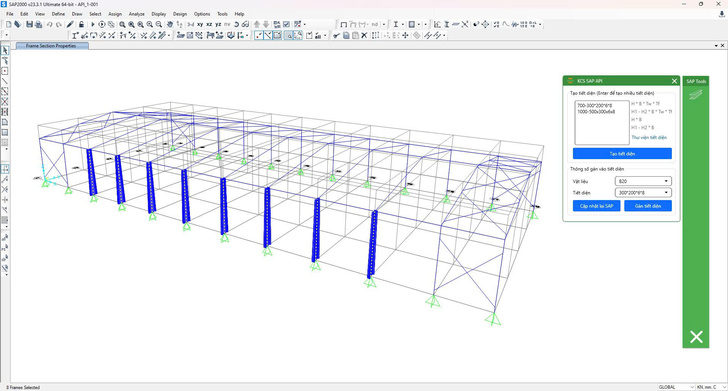
Alongside ETABS, SAP2000 is also a structural analysis software program used in construction engineering design and research. It can model and analyze various structural systems, ranging from frame structures to more complex systems, depending on the engineering problem.
SAP2000 is applicable to problems involving industrial buildings, steel structures, space structures, bridges, and other projects with distinctive load-bearing configurations. Its flexible modeling capabilities allow users to investigate different structural options and evaluate how structures respond to varying loading conditions.
For students, learning SAP2000 provides an opportunity to expand their knowledge of structural analysis, particularly when working on specialized projects or exploring structures beyond conventional residential buildings.
When learning this software, students should focus on developing analytical models, defining materials and cross-sections, specifying support conditions, and applying loads. More importantly, they need to compare software results with theoretical knowledge and appropriate verification methods rather than relying entirely on automatically calculated figures.

Construction Cost Estimation Software – Supporting Quantity Takeoffs and Cost Estimation
In addition to design and structural analysis, quantity takeoffs, cost estimation, and cost control are also important parts of construction project implementation. Therefore, students should become familiar with specialized cost estimation software, such as GXD cost estimation software or equivalent tools suited to job requirements.
These software programs help users compile work quantities, prepare cost estimate tables, and apply norms and unit prices based on input data, thereby supporting the estimation of projected construction costs. Depending on the software and the company’s workflow, these tools may also support the export of tables and the management of data used in preparing project documentation.
For Civil Engineering students, skills in quantity takeoffs and cost estimation provide a better understanding of the relationship between design drawings, construction quantities, and investment costs. This knowledge is valuable for students who aim to become cost estimation engineers, construction economics engineers, or professionals involved in project management.
To use these tools effectively, students need to learn how to read drawings, determine quantities according to the correct principles, understand construction norms, and update data in accordance with current regulations. Software only assists with information processing; the accuracy of the results still depends on the quality of the input data and the user’s competence.

When Should Civil Engineering Students Start Learning Specialized Software?
Students should approach specialized software progressively throughout their studies, beginning with tools for reading and developing technical drawings before moving on to BIM modeling, structural analysis, and construction cost estimation. This learning approach helps them build knowledge systematically and avoid mastering numerous operations without understanding the underlying engineering principles.
In addition, practicing with specialized exercises, academic projects, and simulated construction scenarios will help students use software more effectively. They should also develop their ability to read technical documentation, work in teams, and use foreign languages to access specialized materials when necessary.
Importantly, students do not need to master every software program from the outset. They should choose tools that align with their career goals while building a solid foundation of professional knowledge so they can continue learning as technology and job requirements evolve.
AutoCAD, Revit, ETABS, SAP2000, and construction cost estimation software are valuable tools for Civil Engineering students to explore before entering the labor market. Each program serves a different purpose, from technical drawing development and building modeling to structural analysis and cost management.
Read more: What Career Opportunities Are Available After Graduating in Construction Engineering Technology?
By combining software skills with specialized knowledge, practical abilities, and problem-solving skills, students can gain an additional advantage in their studies, internships, and job searches. Becoming familiar with technology while still at university is a practical step toward building a career in the modern construction industry.
East Asia University of Technology
Phan Tay Nhac Street, Xuan Phuong Ward, Hanoi.
Hotline: 0243.555.2008 or 024.2236.5888
Email: tuyensinh@eaut.edu.vn
Fanpage: https://www.facebook.com/dhcnDongA/